
Wish on a Sea Star App
Design of Global Wish Granting App
My role
Primary Ux Designer, Brand Designer, Researcher
Team
Solo Project
Timeframe
9 weeks
Skills
User experience design
Summary
I created the mobile design for an app where users can make wishes, post them on a map and also grant the wishes of others. For many, dreams are something not thought about often, apart from buying a lottery ticket. But what if there was an app where we could see our dreams more often, with the option of helping people around the world on a collective map of desires?
Final Design


Challenges
Challenges within this app were clustered around the actual enablement of wishing and granting.
1. Verification & trust- how can we give users reassurance and confidence to share their financial information to grant wishes? Should we include photos, messages, confirmations or proof the user must submit when a user chooses to grant their wish to know that it was used for the right purpose.
2.Incentivizing wishing - how can we get users to interact with the platform right away?
The experience using this app can be hindered by unclear steps, lack of emotional feedback, and missing support at key decision points. To build trust and engagement, the app should prioritize clarity, guidance, and emotional storytelling throughout the user journey.
Metrics
Metrics to measure engagement include: Wishes posted, wishes granted, interactions per wish, map engagement, and session length/ frequency.
Technical metrics include: load times and feature usage.
Social metrics include wish granting rate (ratio of posted wishes being granted), user feedback/ratings, and content reporting metrics which tracks flagged content to ensure community safety.
Background
There is a gap in the market for apps that offer the possibility to fulfill the wishes of everyday people. With Go-Fund me being used for larger fundraising efforts, and the make a wish foundation existing exclusively for sick kids, there lacks an in-between platform for the average user to share their desires and for the community to grant answers. How might we create a meaningful space where people can pin their wishes to a map and discover the dreams of others as they browse around the world — fostering a community of empathy? How might we enable users to take part in helping others’ dreams come true through local and global community support?
Use Cases/ Design Research Synthesis:
Use cases: Users who want to capitalize on the power of global good by being a force of positivity by giving, or lean on their neighbour in their time of need by posting a wish hoping for it to be granted.
Design research included:
A user persona, a user journey map, information architecture, flow diagram, and moodboard. These elements came together to inform the wireframe designs. For Affinity Diagramming: Common themes included Travel and Locations, Privacy Concerns, Style, App Features and Emotions.
Findings from the research led us to the following conclusions:
Users Need Simplicity
Many steps in the user journey (especially posting and granting wishes) involve decision points that can feel overwhelming or ambiguous if not made clear with suggestions.
Simpler tasks like viewing wishes are easy and smooth, but more interactive actions (granting or posting) might introduce hesitation due to unclear processes.
Steps Should Avoid Decision Fatigue
Emotional Moments Need Emotional Support
Making a wish or granting one is often tied to hope, need, or generosity, key moments like confirmation or completion needs to evoke emotion.
Without visual or verbal feedback (e.g., animations, messages, social connection), the experience feels transactional instead of magical.
Users Need Guidance
The core idea of sharing and granting wishes is appealing and sparks imagination.
However, users need clearer cues, tooltips, onboarding, and preview options to feel confident navigating the process.
Trust and Clarity are Crucial for Wish Fulfillment
For granting wishes, especially when money, time, or effort are involved, users want reassurance: is this legit? Is the wish realistic? Are they the right person to help?
Ambiguity here reduces willingness to engage.
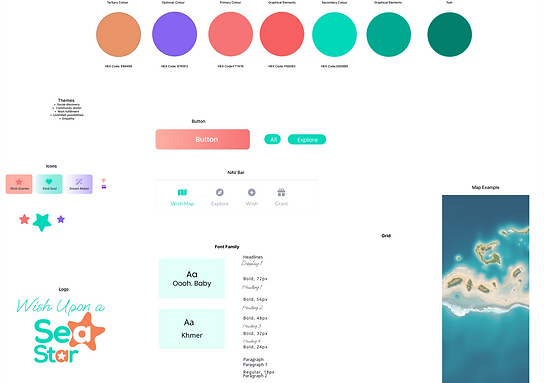
To have a cohesive style in our design, I first created a Style Guide
.png)
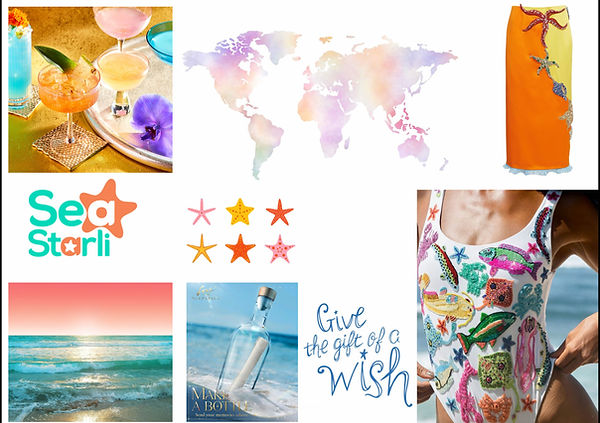
Creating the moodboard first helped us to decide on the colours we wanted to use in the website design
.jpg)
Creating the user persona allowed us to understand the target user

Creating the user journey map helped me to understand what steps the user would be taking

Competitive Analysis
We compared three different restaurants in the brunch space to see how they differed.

User Testing
User testing revealed that participants felt overwhelmed when presented with a single screen containing multiple input fields and a single submit button. Many users expressed a preference for a more guided experience, where the process is broken into smaller, digestible steps rather than one large form. This “journey-style” approach allows users to focus on completing one task at a time, reducing cognitive load and making the app feel more approachable and engaging. Additionally, users indicated that visual cues or transitions between these intermediate screens could reinforce progress and provide a sense of accomplishment as they move through the steps. These findings suggest that introducing modular, step-by-step interactions will enhance usability, improve task completion rates, and contribute to a more delightful user experience.
Final UI Design


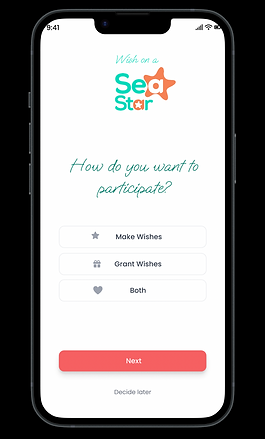


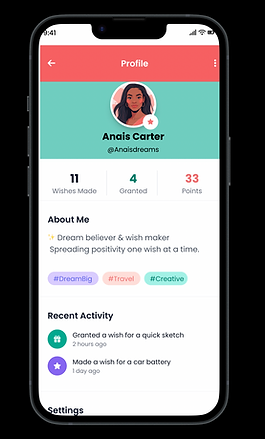
Reflection
Designing the Wish On a Sea Star app at a mid-to-high fidelity stage highlighted the importance of balancing whimsy and usability, ensuring that both posting and granting wishes feel intuitive and engaging. Mapping the global wish board and creating interactive flows for granting wishes emphasized the need for clear visual hierarchy and calls to action to make the experience feel magical yet understandable. Prototyping these interactions allowed me to identify areas where users might feel uncertain, such as confirming a wish has been granted or browsing a crowded map. Accessibility considerations, including readable typography, were explored, but will require further testing across devices and user abilities. The next steps involve incorporating more micro-interactions, branded illustrations across key screens and personalized notifications to enhance the sense of delight and connection.